
AvBrand Exploring Technology
Blog Archives - 2025
2024
2023
2022
Cheapo Power: Power Control on the Cheap
9:36 AM, February 17th, 2016

Check out this article that shows how we control appliances for about $8 an outlet at the Hacklab:
http://www.avbrand...jects/cheapopower/
Add or view comments
Just a quick puppy hello!
4:38 PM, November 21st, 2014


An argument for Electric Trolley Buses in Toronto
12:42 PM, June 23rd, 2014
I was recently given a flyer by a friend, published by Toronto's transit company, the TTC. The flyer advertised the arrival of our new streetcar fleet, being delivered between late 2014 and 2018, purchased to replace our aging fleet of existing streetcars that have been in service since the late 70's.
The new streetcars are made by Bombardier and are called "Flexity". They are made up of five pieces, separated by 4 articulating sections. With the floor only 12 inches off the ground, they should be easier to ride for people with mobility issues. An extendable ramp helps wheelchairs, scooters, and carriages on board.
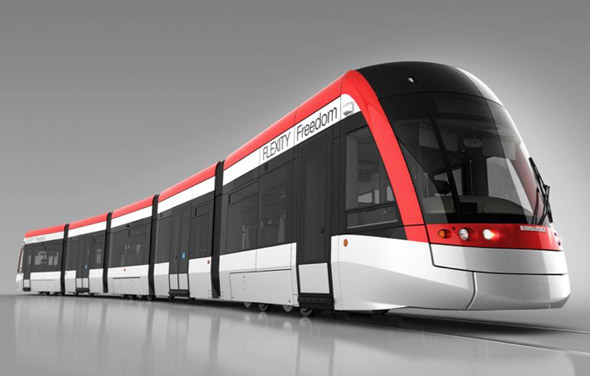
The TTC has ordered 204 of these streetcars, at a cost of $1.2-billion, or about $5.8-million each. The streetcar is 98 feet long, seats 70, and can carry an additional 181 standing passengers, for a total estimated capacity of 251 people. They are powered by a pantograph system that draws electricity from overhead wires, and have a maximum speed of 70 km/h. They are expected to last 30 years.
Sounds great, right? Except, anyone who has used the streetcars in Toronto has probably noticed that the system isn't ideal. Streetcars share the road with cars, trucks, and bicyclists on most routes, and require traffic to come to a stop to take on or disgorge passengers. At other times, they are at the mercy of the traffic in front of them. During rush hour, streetcars can average less than 5 km/h.
Streetcars are also unable to navigate around obstacles in the road, such as broken-down cars, delivery vehicles parked too far into the track, left-turning vehicles, other streetcars, and more. Since they ride on a track, the only directions they may turn is where the track exists and where the mechanical switch is functional. This track network is another problem: It must be constantly repaired and maintained, at great cost. Usually, a main thoroughfare must be closed for months as the tracks are completely replaced, one rail at a time, and this work lasts only 10-20 years. St. Clair Avenue was recently upgraded to have a streetcar right-of-way, at a cost of $106-million.
Beyond the cost of the new streetcars themselves, the required infrastructure to support them is also expensive. The TTC is spending $700-million on building a new carhouse, upgrading platforms, installing curb cuts, and more. This brings the total price tag for these new streetcars to $1.9-billion.
But is there a better way?
There is. A transit vehicle exists that has a lower cost-per-passenger, much lower infrastructure costs, and at the same time, solves many of the other issues that plague streetcars. That vehicle is the electric trolley bus.
Once upon a time, Toronto had a small fleet of electric trolley buses, and a few lines on which they ran. The last of these was shut down in 1992, apparently to avoid the cost of maintenance that the electric lines required, and due to the promised efficiency of natural gas buses. Those buses have turned out to be not as promised, and the TTC has all but abandoned the natural gas-powered bus.
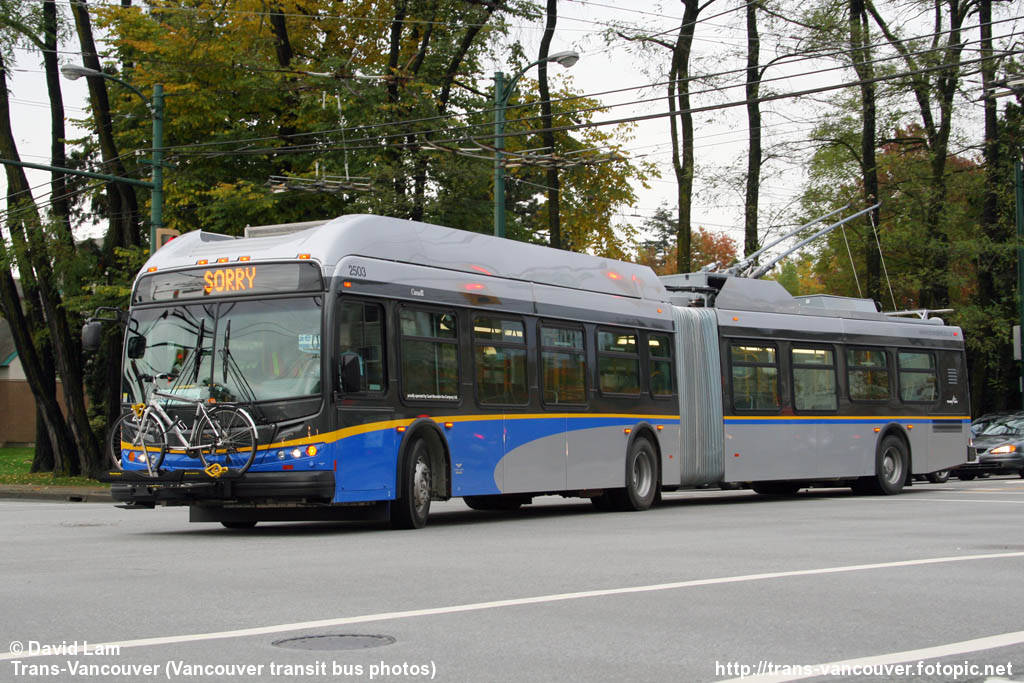
Pictured is the Flyer E60LFR, found in Vancouver
Electric trolley buses have been in use for many years in Vancouver, with great success. They have the energy efficiency and cleanliness of electric streetcars, but without many of the restrictions. They are able to navigate into and out of bus bays, as well as traverse both lanes of traffic, so passengers do not need to cross live lanes. They are just as friendly to people with mobility issues, featuring low-floor boarding and extendable ramps. The capacity is not as high as our new streetcars, but is still respectable: 47 seated, 73 standing, for a total of 120 passengers.
The big savings come in the form of cost. In Vancouver, a recent extension of a trolley-bus line of 3.1km cost a mere $1.5-million, or about $483,000 per kilometre. The above-road electric lines also require far less maintenance than in-ground tracks, as they are not subject to tires, road salt, plowing, and other maintenance. The single biggest line-item on savings is the cost of each vehicle, hovering just around $700,000, or over 8 times cheaper than the Bombardier FLEXITY. The cost per passenger (that is, the cost of the vehicle divided by capacity) is just $5,800, compared with $23,400 on the streetcar. And that's not even taking into account that giant streetcar $700m infrastructure price tag.
These buses are cheaper than streetcars, quieter than streetcars, can go where streetcars can't go, and don't require an expensive and limiting track network. It seems like a no-brainer to me: Toronto needs electric trolley buses!
Do I expect to see electric trolley buses on Toronto's streets anytime soon? No. It's very unlikely that Toronto will move away from her beloved streetcars, despite the many problems they inherently possess. But I'd like to at least imagine a future where traffic doesn't have to move at the speed of these giant behemoths as they lumber noisily along the street.
Add or view comments
The new streetcars are made by Bombardier and are called "Flexity". They are made up of five pieces, separated by 4 articulating sections. With the floor only 12 inches off the ground, they should be easier to ride for people with mobility issues. An extendable ramp helps wheelchairs, scooters, and carriages on board.
The TTC has ordered 204 of these streetcars, at a cost of $1.2-billion, or about $5.8-million each. The streetcar is 98 feet long, seats 70, and can carry an additional 181 standing passengers, for a total estimated capacity of 251 people. They are powered by a pantograph system that draws electricity from overhead wires, and have a maximum speed of 70 km/h. They are expected to last 30 years.
Sounds great, right? Except, anyone who has used the streetcars in Toronto has probably noticed that the system isn't ideal. Streetcars share the road with cars, trucks, and bicyclists on most routes, and require traffic to come to a stop to take on or disgorge passengers. At other times, they are at the mercy of the traffic in front of them. During rush hour, streetcars can average less than 5 km/h.
Streetcars are also unable to navigate around obstacles in the road, such as broken-down cars, delivery vehicles parked too far into the track, left-turning vehicles, other streetcars, and more. Since they ride on a track, the only directions they may turn is where the track exists and where the mechanical switch is functional. This track network is another problem: It must be constantly repaired and maintained, at great cost. Usually, a main thoroughfare must be closed for months as the tracks are completely replaced, one rail at a time, and this work lasts only 10-20 years. St. Clair Avenue was recently upgraded to have a streetcar right-of-way, at a cost of $106-million.
Beyond the cost of the new streetcars themselves, the required infrastructure to support them is also expensive. The TTC is spending $700-million on building a new carhouse, upgrading platforms, installing curb cuts, and more. This brings the total price tag for these new streetcars to $1.9-billion.
But is there a better way?
There is. A transit vehicle exists that has a lower cost-per-passenger, much lower infrastructure costs, and at the same time, solves many of the other issues that plague streetcars. That vehicle is the electric trolley bus.
Once upon a time, Toronto had a small fleet of electric trolley buses, and a few lines on which they ran. The last of these was shut down in 1992, apparently to avoid the cost of maintenance that the electric lines required, and due to the promised efficiency of natural gas buses. Those buses have turned out to be not as promised, and the TTC has all but abandoned the natural gas-powered bus.
Pictured is the Flyer E60LFR, found in Vancouver
Electric trolley buses have been in use for many years in Vancouver, with great success. They have the energy efficiency and cleanliness of electric streetcars, but without many of the restrictions. They are able to navigate into and out of bus bays, as well as traverse both lanes of traffic, so passengers do not need to cross live lanes. They are just as friendly to people with mobility issues, featuring low-floor boarding and extendable ramps. The capacity is not as high as our new streetcars, but is still respectable: 47 seated, 73 standing, for a total of 120 passengers.
The big savings come in the form of cost. In Vancouver, a recent extension of a trolley-bus line of 3.1km cost a mere $1.5-million, or about $483,000 per kilometre. The above-road electric lines also require far less maintenance than in-ground tracks, as they are not subject to tires, road salt, plowing, and other maintenance. The single biggest line-item on savings is the cost of each vehicle, hovering just around $700,000, or over 8 times cheaper than the Bombardier FLEXITY. The cost per passenger (that is, the cost of the vehicle divided by capacity) is just $5,800, compared with $23,400 on the streetcar. And that's not even taking into account that giant streetcar $700m infrastructure price tag.
These buses are cheaper than streetcars, quieter than streetcars, can go where streetcars can't go, and don't require an expensive and limiting track network. It seems like a no-brainer to me: Toronto needs electric trolley buses!
Do I expect to see electric trolley buses on Toronto's streets anytime soon? No. It's very unlikely that Toronto will move away from her beloved streetcars, despite the many problems they inherently possess. But I'd like to at least imagine a future where traffic doesn't have to move at the speed of these giant behemoths as they lumber noisily along the street.
Add or view comments
Such long time since update!
8:43 AM, June 9th, 2014
Sorry about the long time since updates. I've been busy renovating and with all sorts of crazy projects, but I need to find time to post them.
In the meantime, here is a photo from January of me walking my dog across the lake.

Add or view comments
In the meantime, here is a photo from January of me walking my dog across the lake.
Add or view comments
Trying to read a broken SD card...
10:01 AM, August 19th, 2013
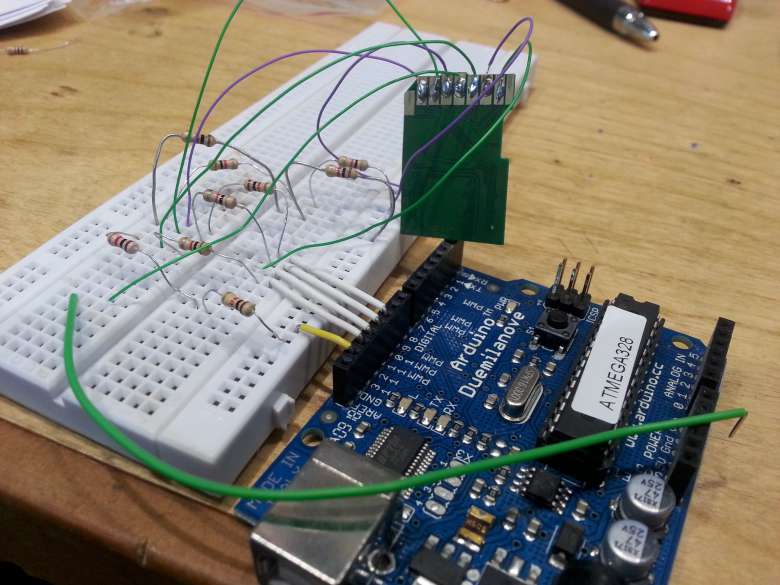
 The card is so dead.
Scuba Diving in Tobermory this past weekend
8:08 AM, July 22nd, 2013
I went scuba diving in Tobermory the past few days. Brrrr, it is COLD! My computer registered the bottom temperature at 2.2 C (36 F for you Americans)... cold cold cold!!
Still, some pretty awesome scenery. Enjoy the video.
Add or view comments
Still, some pretty awesome scenery. Enjoy the video.
Add or view comments
Alpha Sign Library updated to 1.1
12:25 PM, March 28th, 2013
I've updated my Alpha Sign Library to version 1.1 with a lot of stability fixes.
Enjoy!
http://www.avbrand...re/alphasigncomms/
Add or view comments
Enjoy!
http://www.avbrand...re/alphasigncomms/
Add or view comments
Not So Perfect Anymore
9:18 AM, November 15th, 2012
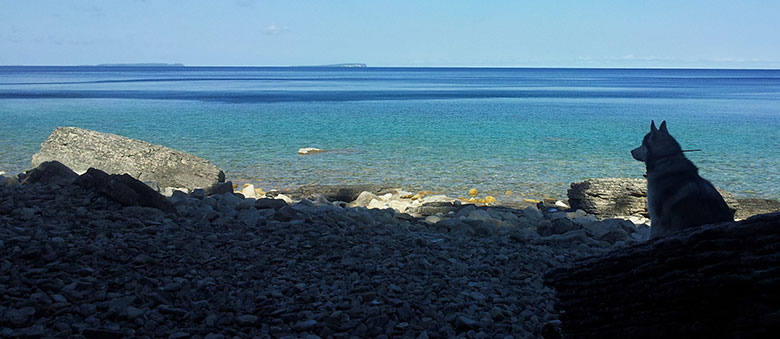
Since Taiga, my dog, entered into my life, it's been an interesting ride. From the horrible lows at the start to the greatest highs, I wouldn't trade the last three years for anything. Taiga and I have become a unit, very close even when we're apart.
Taiga recently had a seizure. I wasn't sure what to make of it at first, and I didn't worry myself too much. The vet said it was most likely epilepsy. He said it was common in dogs in general and huskies / mals in particular. Taiga is also at the right age for it to set in.
I still thought, no, this couldn't be, Taiga's been perfectly healthy and perfectly fine and has never had a problem. I put it off. I hoped that the 2nd seizure would never come; that it had been a one-time thing.
This morning, Taiga had his second seizure. It was about the same as the first, perhaps a bit longer, and Taiga seemed even more dazed and confused after it. He whimpered and whined during the last 15 seconds of the seizure and I could do nothing but hold him gently and wait for it to end.
It seems pretty confirmed that he does indeed have epilepsy.
It's a new world going forward... I'm not sure how I'm going to do, which is why I'm making this post. Taiga and I both need the support of our friends to get through this. I'll keep you updated.
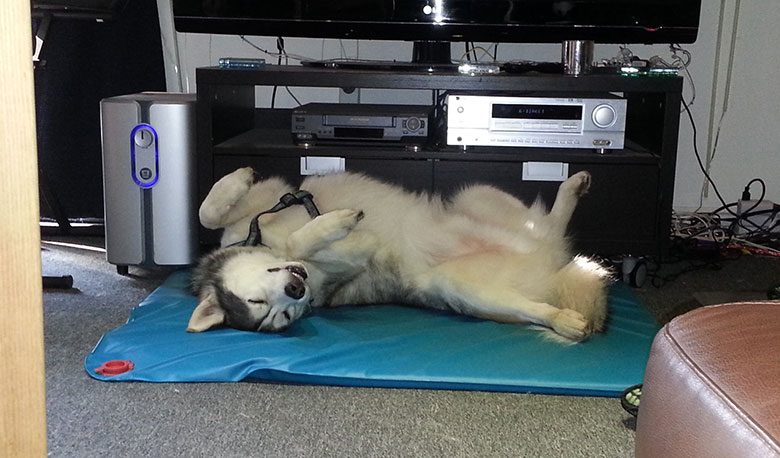
Here's a photo of Taiga sleeping, taken yesterday afternoon:
Add or view comments
Home-Made Ambilight
11:16 PM, September 18th, 2012
I know there's lots of home-made ambilights out there, but I think this is the first one I've seen to use the GE Color Effects Christmas lights.
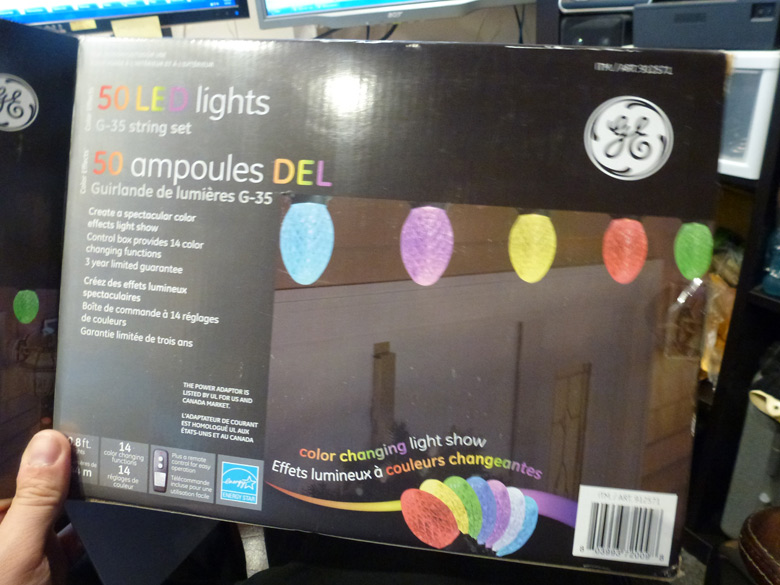
If you've not heard of these, it's an inexpensive (relatively) set of xmas lights with addressable bulbs. That is, you can individually set each bulb to any color. A set of 50 bulbs is about $70 here in Canada at Costco, and they are very very easy to hack. Just two wires to get an Arduino talking to it.
See the rest of this entry...
Add or view comments
If you've not heard of these, it's an inexpensive (relatively) set of xmas lights with addressable bulbs. That is, you can individually set each bulb to any color. A set of 50 bulbs is about $70 here in Canada at Costco, and they are very very easy to hack. Just two wires to get an Arduino talking to it.
See the rest of this entry...
Add or view comments
Diving in Brockville!
1:55 PM, June 26th, 2012
Just completed my Advanced Scuba diver certification! Here's a little video I made.
Dive weekend on June 23/24, with Water Sports Scuba out of Toronto.
We did four wrecks: the Robert Gaskin, the Muscallonge, the Henry C. Daryaw, and the Lillie Parsons.
Excuse the poor composition of the video; I was doing my Advanced Diver course at the same time so I was concentrating more on skills and my instructor than on the camera.
Shot with a GoPro Hero2 HD, with the new dive housing.
Music by M83.
Add or view comments
Dive weekend on June 23/24, with Water Sports Scuba out of Toronto.
We did four wrecks: the Robert Gaskin, the Muscallonge, the Henry C. Daryaw, and the Lillie Parsons.
Excuse the poor composition of the video; I was doing my Advanced Diver course at the same time so I was concentrating more on skills and my instructor than on the camera.
Shot with a GoPro Hero2 HD, with the new dive housing.
Music by M83.
Add or view comments
New LED sign in car
12:46 PM, May 27th, 2012
In May 2012, I was contacted by a representative of www.brightledsigns.com, asking if I'd be interested in replacing my
Amber-colored NS500 LED window sign with the 3-color model of the same sign.
Full disclosure: They offered to send me one in exchange for me checking it out and putting it up on my site.
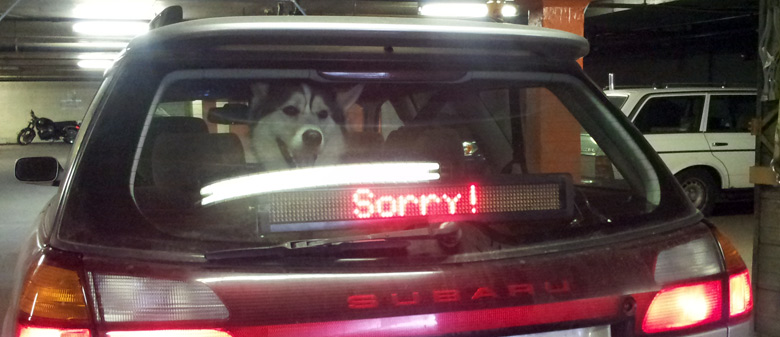
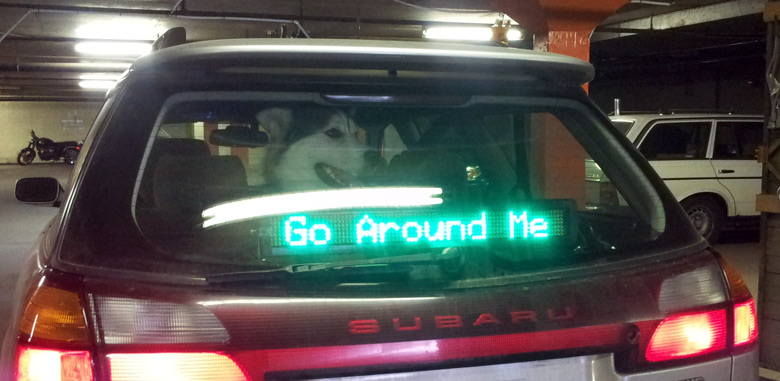
The sign has one high-brightness red and one high-brightness green LED for each pixel. This means it can still create Amber by turning both LEDs on, but be warned, the color is more of a yellowish-green, vs the true amber that the previous sign created. However, I will still interested in trying it out. I figure I can use Amber most places and then green or red in special occasions, even if they may be skirting the Highway Traffic Act.
The green text looks incredibly sharp and easy to read, and I think it's a huge improvement over the old sign. Since it uses the same 5V power supply, mounting brackets, and serial cable, it was a drop-in replacement. However, the serial protocol is completely different and required me to, once again, reverse engineer the protocol. The new sign runs at 4 times the speed of the old one, and has a much simpler protocol, so it is much easier to use and can be programmed much much faster.
Read more and see a video here:
http://www.avbrand...cts/carpc/ledsign/
You can buy this exact sign here: 4x26 Windowfront Three Color Programmable LED sign for $219.
Add or view comments
Amber-colored NS500 LED window sign with the 3-color model of the same sign.
Full disclosure: They offered to send me one in exchange for me checking it out and putting it up on my site.
The sign has one high-brightness red and one high-brightness green LED for each pixel. This means it can still create Amber by turning both LEDs on, but be warned, the color is more of a yellowish-green, vs the true amber that the previous sign created. However, I will still interested in trying it out. I figure I can use Amber most places and then green or red in special occasions, even if they may be skirting the Highway Traffic Act.
The green text looks incredibly sharp and easy to read, and I think it's a huge improvement over the old sign. Since it uses the same 5V power supply, mounting brackets, and serial cable, it was a drop-in replacement. However, the serial protocol is completely different and required me to, once again, reverse engineer the protocol. The new sign runs at 4 times the speed of the old one, and has a much simpler protocol, so it is much easier to use and can be programmed much much faster.
Read more and see a video here:
http://www.avbrand...cts/carpc/ledsign/
You can buy this exact sign here: 4x26 Windowfront Three Color Programmable LED sign for $219.
Add or view comments
Taiga's on Target!
10:36 PM, April 28th, 2012

Adding a 'Paste Code' feature to Outlook 2010/2007
8:20 AM, April 17th, 2012
I recently switched to Outlook for my corporate email, and one of the biggest features I missed that I had as a Thunderbird extension was the 'Paste Code' ability. When I shared code with my coworkers, I'd use Paste Code to pretty it up and add syntax highlighting and formatting.
So, here's how to set this up in Outlook.
See the rest of this entry...
Add or view comments
So, here's how to set this up in Outlook.
See the rest of this entry...
Add or view comments
Fun with Embroidery!
11:02 AM, March 9th, 2012
The other day I was flipping through the latest issue of "Costco Connection" and I saw that there was a sale on for the Brother HE-240 Sewing Embroidery machine. I'd dabbled with Embroidery before, briefly, and it was something I was interested in exploring further. So I ordered it and it came a week later:

See the rest of this entry...
Add or view comments
See the rest of this entry...
Add or view comments
Just another quick photo of Taiga
10:44 AM, February 7th, 2012


Reddit, Repercussions and Relatives - An Interview with David Thorne
12:11 AM, December 29th, 2011
Reddit, Repercussions and Relatives
An interview with New York Times Best-selling author David Thorne, of www.27bslash6.com
By Alex H
Waiting for David Thorne to show up for an interview, at a seedy bar in downtown Toronto, the thought that he might not show up, as some form of prank, crossed my mind. Or worse, he might. Glancing at my wrist and wondering if I still had to time to leave before he arrived, I heard a deep Australian accent state "Sorry I'm late, a dingo stole my baby." I first wrote to Thorne over a year ago when I ordered his first book, The Internet is a Playground, and, along with around a hundred others, didn't receive my copy. After an exasperating delay due to delivery issues with Thornes's publisher, and a well documented run-in with one of Thorne's now ex-employees, my copy finally arrived four months later. Admittedly, it was worth the wait. Learning that Thorne was visiting Toronto this week for a snowboarding trip, I emailed him asking if he would be up for an interview for www.avbrand.com over a few drinks. He replied "Sounds good. As long as you are paying for them."
See the rest of this entry...
Add or view comments
An interview with New York Times Best-selling author David Thorne, of www.27bslash6.com
By Alex H
Waiting for David Thorne to show up for an interview, at a seedy bar in downtown Toronto, the thought that he might not show up, as some form of prank, crossed my mind. Or worse, he might. Glancing at my wrist and wondering if I still had to time to leave before he arrived, I heard a deep Australian accent state "Sorry I'm late, a dingo stole my baby." I first wrote to Thorne over a year ago when I ordered his first book, The Internet is a Playground, and, along with around a hundred others, didn't receive my copy. After an exasperating delay due to delivery issues with Thornes's publisher, and a well documented run-in with one of Thorne's now ex-employees, my copy finally arrived four months later. Admittedly, it was worth the wait. Learning that Thorne was visiting Toronto this week for a snowboarding trip, I emailed him asking if he would be up for an interview for www.avbrand.com over a few drinks. He replied "Sounds good. As long as you are paying for them."
See the rest of this entry...
Add or view comments
A quick photo of Taiga from the other day.
10:26 AM, December 21st, 2011

Musings on Artificial Intelligence and chat bots
11:55 PM, December 14th, 2011
Over on one of my sites, www.uer.ca, I have a chatroom for members to use. Although the site is dedicated to Urban Exploration, the chatroom often features a variety of topics and usually contains anywhere from 4 to 20 people at any time of day.
Around the holiday season, to make the chatroom more interesting, I switch on a bot that I wrote called the "Santa Bot". It's an automated chat bot that interacts with the participants in the room, and appears to them just like any other user. He responds to direct questions, and also responds to select statements. He also speaks at other times.
I'm not much for AI (Artificial Intelligence) -- I've never had much interest trying to write something that pretends to be a person. Most chatbots out there are extremely complex, and they work by trying to figure out what you mean when you talk to them. Saying "How are you" usually results in a response like "I am fine", since the bot has either been programmed to understand that question or has learned the appropriate response.
Writing that kind of algorithm seemed much too complex for me -- I just wanted a simple bot that I could use to entertain the chat users. So, over the last few years, the Santa Bot has evolved into its current incarnation, which results in wonderful interactions such as this one:
See the rest of this entry...
Add or view comments
Around the holiday season, to make the chatroom more interesting, I switch on a bot that I wrote called the "Santa Bot". It's an automated chat bot that interacts with the participants in the room, and appears to them just like any other user. He responds to direct questions, and also responds to select statements. He also speaks at other times.
I'm not much for AI (Artificial Intelligence) -- I've never had much interest trying to write something that pretends to be a person. Most chatbots out there are extremely complex, and they work by trying to figure out what you mean when you talk to them. Saying "How are you" usually results in a response like "I am fine", since the bot has either been programmed to understand that question or has learned the appropriate response.
Writing that kind of algorithm seemed much too complex for me -- I just wanted a simple bot that I could use to entertain the chat users. So, over the last few years, the Santa Bot has evolved into its current incarnation, which results in wonderful interactions such as this one:
[23:15:04] <Aleksandar> santa, you dont know what fus do rah is?
[23:15:07] <Santa> its better you dont know what that is
See the rest of this entry...
Add or view comments
Stupid shipping from Lenovo
4:50 PM, November 16th, 2011
I recently ordered a laptop sleeve along with a new laptop from Lenovo. For some reason they came in separate shipments.
The laptop sleve came in a HUGE box, much bigger than even the box the laptop came in, even though it would have easily fit inside a bubble mailer, along with enough construction paper to supply a Jack Astor's for a week.
1.
 See the rest of this entry...
Add or view comments
The laptop sleve came in a HUGE box, much bigger than even the box the laptop came in, even though it would have easily fit inside a bubble mailer, along with enough construction paper to supply a Jack Astor's for a week.
1.
See the rest of this entry...Add or view comments
Picnic table build
10:04 PM, November 14th, 2011
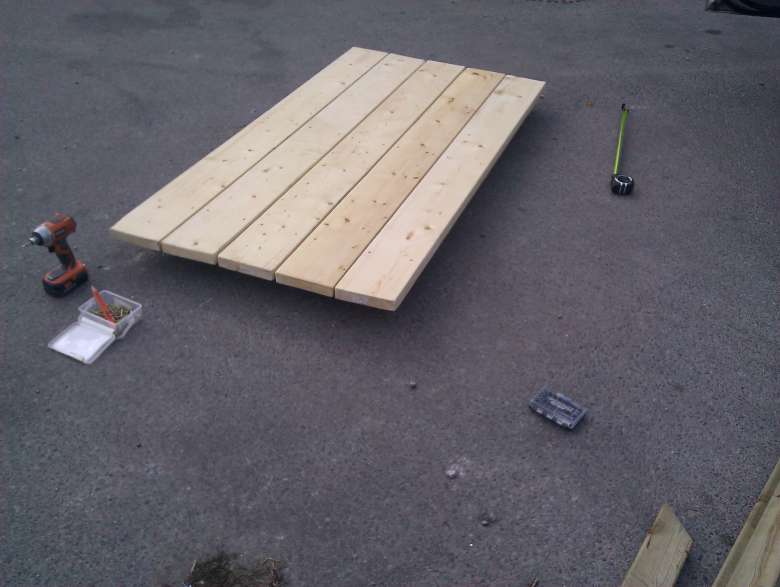
Not very exciting, I know, and a few weeks old, but I wanted to share the photos. I built a nice picnic table from scratch for the park where I go each morning with my dog.
It's basically a piece of private land that's not really used for anything, so a bunch of us meet there and let our dogs run around. To keep people from stealing my table, I chained it to a tree.
Since the table wouldn't fit in my car, I transported it as raw wood and assembled it there. I cut, sanded, and sealed each piece in my garage first.
1.
See the rest of this entry...
Add or view comments
It's basically a piece of private land that's not really used for anything, so a bunch of us meet there and let our dogs run around. To keep people from stealing my table, I chained it to a tree.
Since the table wouldn't fit in my car, I transported it as raw wood and assembled it there. I cut, sanded, and sealed each piece in my garage first.
1.
See the rest of this entry...
Add or view comments
Older Entries...